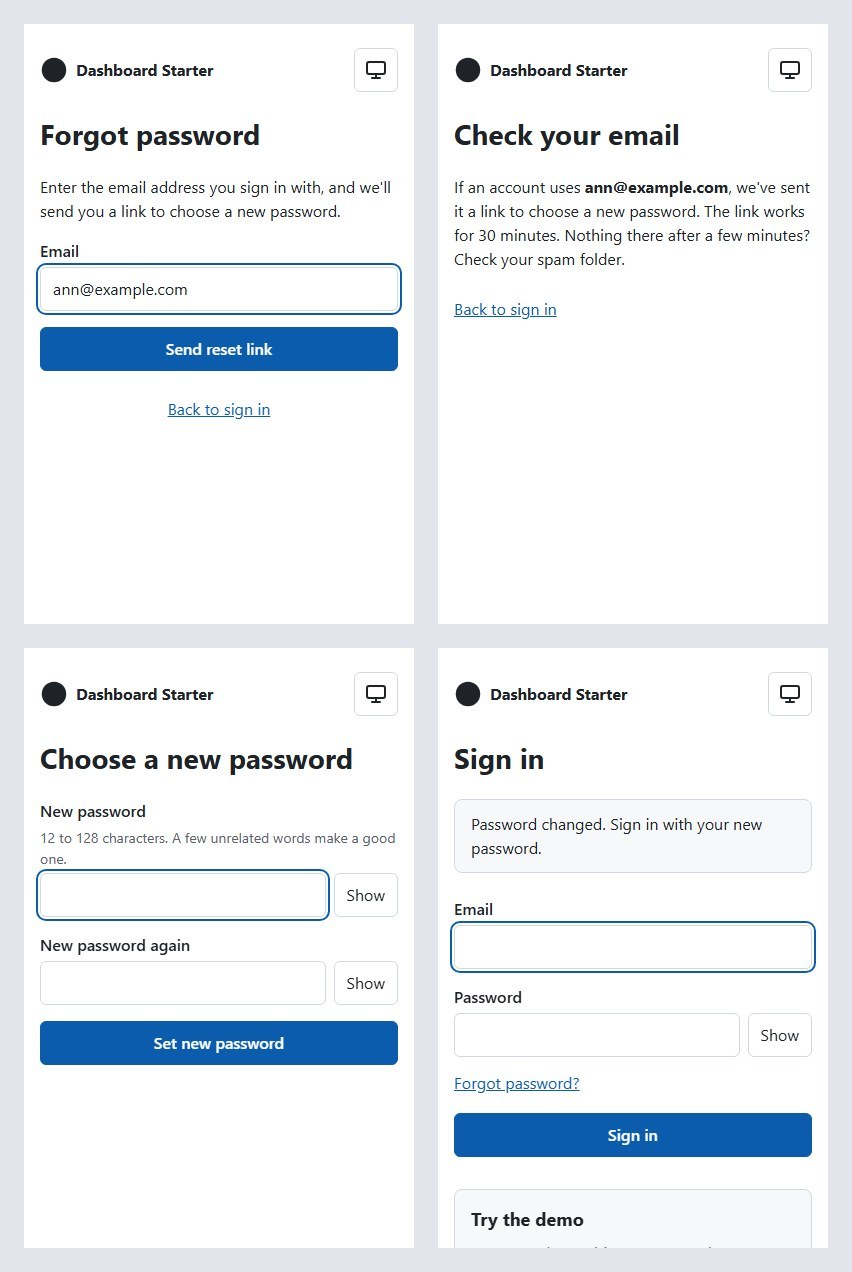
Step 6 is merged: forgot password, reset password, and change password. Sign in at dashboard.mvmorten.com and the account menu now has "Change password." Locally, "Forgot password?" sends you a real reset link.
On the live site, it doesn't send anything, and that's on purpose. The code is there and the sending domain is set up, but email stays switched off outside development.
Michael's tip
It's basically an open email for spammers, so we leave it dev only.
As built, forgot-password only ever emails an address that already has an account, at most three times an hour, so it can't be used to email strangers. But the only account on the live demo is the shared one, guest@example.com. It can't reset its password, and example.com is a domain reserved for examples that can't receive mail anyway. Turning email on would send nothing and only add one more thing that could go wrong.
The next email features, like sign-up or invites, send to addresses people type in. That's exactly what spammers look for, and it can wreck a sending domain's reputation. So email stays a development feature until there's a reason to send, and protections that fit what's sending.
The plan was Azure
The brief said Azure Communication Services. ACS Email can be called with the app's managed identity, the same way the app already reaches Key Vault: no secret, no new package, all inside Azure. For an Azure starter, it was the obvious answer.
Then I read the fine print. In September, Microsoft published a retirement guide for Azure Communication Services: ACS is being retired as a standalone offering, and Email is on the list, gone after September 30, 2028. Until then it's in maintenance mode, security and critical fixes only. You can still create new ACS Email resources today, but Microsoft says that "is subject to change at any time."
Michael's tip
ACS would be the awesome Azure solution, but they ruined it!
That's enough for me. I wouldn't start a new project on a service with a two-year end date, in maintenance mode, that might close to new resources any day.
Email is a style kit
So we picked again: SendGrid, Amazon SES, Postmark, Resend. SendGrid has dropped its permanent free plan. SES is the cheapest at volume, but it means request signing, an access key, and a sandbox to get out of. Resend's free plan covers 3,000 emails a month, and sending one is a single HTTPS call with an API key. No package, no signing code.
Michael's tip
Email is like a style kit: everyone will have different needs.
That's the real decision. The starter doesn't need to pick the right email provider for every app built on it. It needs one that works for the demo, behind something a fork can replace. Everything goes through an IEmailSender interface, and there are three senders: Resend, a development sender that writes emails to text files, and Off. A fork that wants SES or SMTP writes one class.
There's a bonus: Resend is no more Azure-specific than SMTP is. Data Protection is still the only Azure-only code in the app.
The trade is the managed identity. Resend needs an API key. It's a sending-only key, restricted to one domain, stored in the GitHub environment and App Service settings like the other secrets.
Infrastructure first, this time
Post 5's lesson was that I merged code that needed Azure resources nobody had created, and every deploy failed until they existed. So this step started the other way around: the setup guide and the deploy guard came first, then the Resend domain, the DNS records, and the key, then the code.
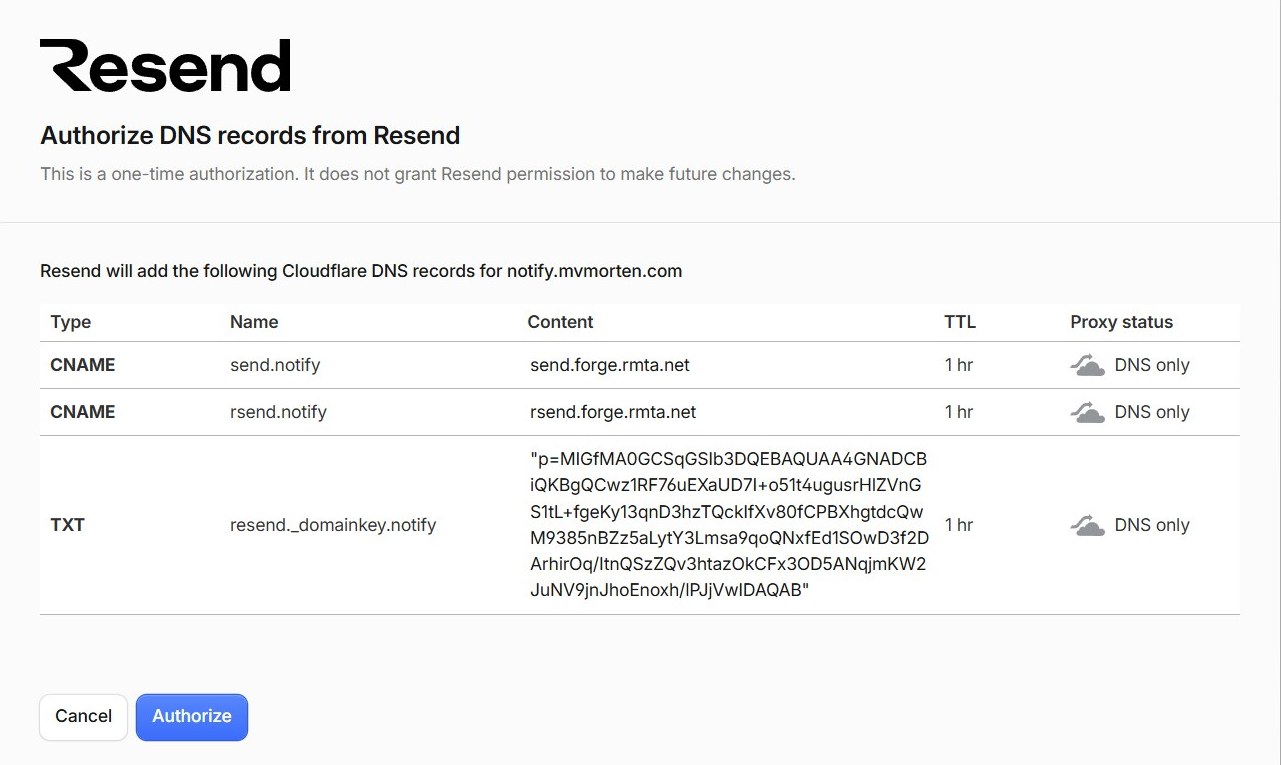
The DNS part took two minutes. I added notify.mvmorten.com in Resend, it noticed the domain is on Cloudflare, and offered to add the records itself through Cloudflare's Domain Connect. One authorize screen, and the domain went from added to verified in two minutes.
Michael's tip
Resend plus Cloudflare is easy. Almost magic, but I could see the DNS records before approving them.
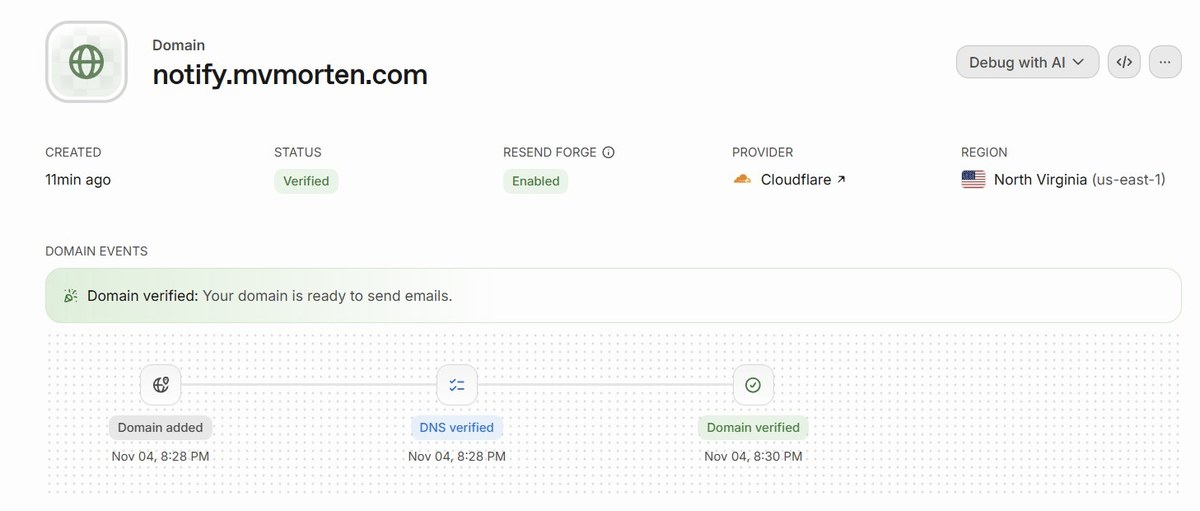
It also showed the guide was already out of date. The guide and the deploy guard were written from Resend's Cloudflare instructions, which list an MX record and an SPF record. What the button actually added was two CNAME records pointing at Resend's servers, which publish those records behind them. The guard looked for the SPF record by name, so once email was on, it would have failed every deploy. It now follows the CNAME and accepts either shape. Lesson: the provider's own domain page is the source of truth, and the guide now says so.
The guard can't ask Resend whether the domain is verified, because the app's key is sending-only and a sending-only key can't read domain status. A second, full-access key just for the deploy would undo the point of the first. So the deploy checks what anyone can see, the DNS records, and the "Verified" in Resend's dashboard was confirmed by hand before merge.
The link is the password
A reset link is as good as a password for 30 minutes, so most of this step is about where that link can leak.
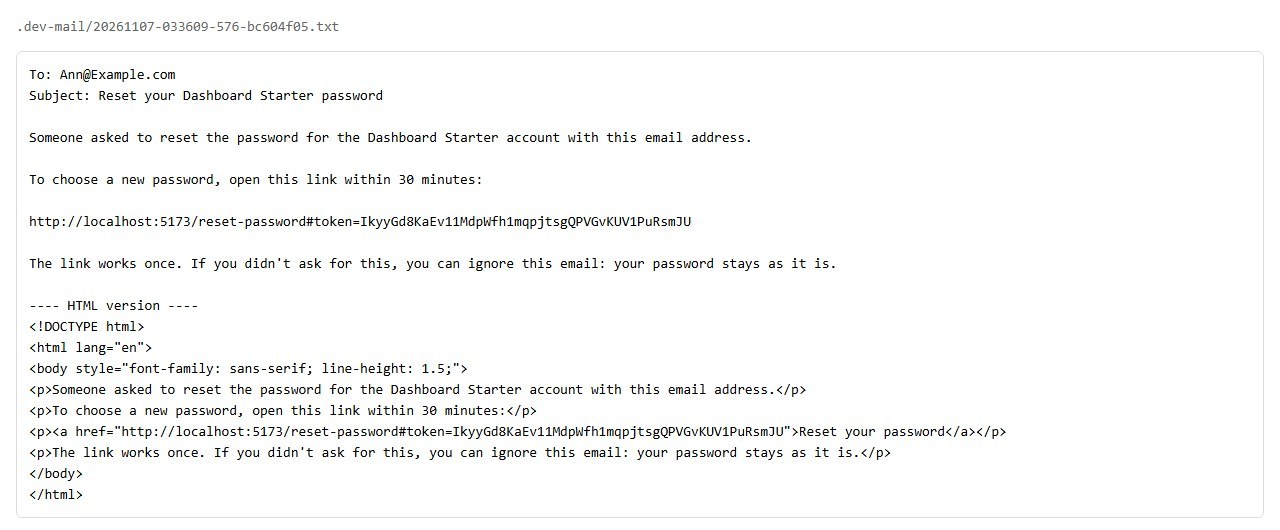
The token. 32 random bytes from .NET's RandomNumberGenerator, sent as Base64Url. The database stores only a SHA-256 hash of it, so a copy of the table doesn't let anyone reset anything. It works once and expires after 30 minutes.
The host comes from configuration. The link is built from the CanonicalHost setting, never from the request. If it used the request's Host header, someone who could set that header could get your reset email to point at their own domain.
The token goes after a #. The link looks like /reset-password#token=.... Browsers don't send the part after the # to the server, so the token never lands in server logs or proxy logs. The reset page reads it once, then removes it from the address bar. Every response also says Referrer-Policy: no-referrer, so the page never hands its URL to another site.
Using it ends every session. A reset sets the new password, writes a new security stamp so every signed-in device is signed out, clears any lockout, and throws away the user's other tokens. It doesn't sign you in. It sends you to the sign-in page, which also proves the new password works.
Same answer for everyone
The forgot-password form must not tell anyone which emails have accounts. So it always answers the same way: "If an account uses this address, we've sent it a link." That's true for a real account, an unknown address, the demo account, and an address that has hit its limit.
The message is the easy part. Timing is harder. If a real account takes longer to answer because the app is waiting on the email service, the delay gives it away. So forgot-password puts the email in a small in-memory queue and returns straight away, and a background service sends it. That's a Channel and a BackgroundService, both built into .NET, not a job framework. The accepted cost: if the app restarts at the exact moment a message is queued, that message is lost and the person asks again.
There's also a limit of three emails per address per hour, so the form can't be used to flood someone's inbox. My brief nearly broke it. It said to delete a user's old tokens whenever a new one is issued, but the hourly count lives in those rows. Claude Code caught it. Now a new token expires the old ones at once, and rows are deleted after an hour, or when a reset succeeds.
Change password
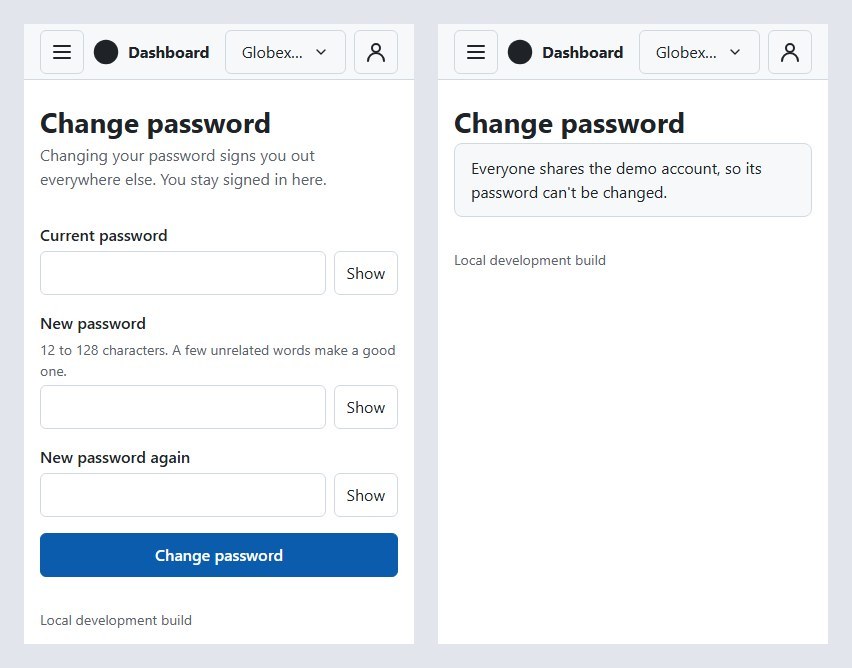
Changing your password while signed in needs your current one, and a wrong guess counts toward lockout. Afterward, every other device is signed out and this one stays in, because the app reissues this session's cookie with the new security stamp.
Two details came out of building it:
It can lose a race. The update only succeeds if the stored hash is still the one that was just checked. If a reset got there first, you get a conflict, not a silent overwrite.
The antiforgery token changes too. It's tied to the signed-in identity, so after a password change the front end fetches a fresh one. Otherwise the next form you submitted would be rejected.
The demo account can't change its password, for the same reason it's exempt from lockout: everyone shares it.
Password rules
12 to 128 characters, and not the same as your email. No "one uppercase, one number, one symbol," following current NIST guidance: composition rules mostly produce Password1!. The page suggests a few unrelated words instead. The 128 limit is there because Argon2id hashing has a cost, and nobody needs a password longer than that. The API and the Db runner's create-user and set-password share the same rules.
Email off is a real setting
That's also how the live site runs. A fork that hasn't picked an email provider still runs. The sign-in page asks the API whether email is on, and only shows "Forgot password?" when a link can actually be sent. In development, emails land as text files in .dev-mail/ in the repo, and the API logs only the file name. Never the link: a token in a log is a token anyone with the logs can use.
The API also refuses to start with a half-set email configuration, like a key without a sender, rather than failing later when someone asks for a reset.
CI resets a password on every pull request
Like the step 5 sign-in checks, a new script runs against a real SQL Server:
- Forgot-password gives the same answer for a real account, an unknown one, and the demo account, and only the real one gets an email file.
- The link resets the password, the old password stops working, and a session from before the reset is signed out.
- The same link can't be used twice. A second copy of the API with 2-second links checks that links expire.
- Change password keeps this session and ends the other one.
- The fourth email in an hour isn't sent.
- 11 characters is rejected, 12 accepted, 129 rejected.
- In Production mode with no provider, email reports as off and the Referrer-Policy header is set.
The no-TODO check, and what it didn't catch
Post 5's main PR merged with its checks section still saying TODO. So this step added a small workflow that fails any pull request whose description contains the word. It reads the description through an environment variable rather than pasting it into a script, since a PR description is text anyone can write.
It worked, and it also showed its limit. The step 6 PR said the change password page and the account menu "get checked before this is marked ready, and this line gets updated." That's a TODO without the word, so the check passed, and the PR merged with the line unchanged.
I checked those screens after merging, at phone and desktop widths, and they were fine. But that's after, not before.
A word filter catches the habit, not the intent. Reading the PR before merging is still the check.
CodeQL guesses by name
CodeQL flagged a log line after a reset as "cleartext storage of sensitive information." The value was the user's numeric id, which every request's log scope already includes. CodeQL flagged it because the method that returned it was called ResetPasswordAsync, and it treats anything coming out of a method with "Password" in the name as a password. The fix was a rename to CompleteResetAsync, which also describes what it does. Same rule as post 5: fix it, or explain it, don't just dismiss it.
Working with AI on this
Same setup: one AI to plan and write the brief, Claude Code to build and test.
Claude Code started on the old plan. It began building for ACS, from the first version of the brief, before the switch to Resend. Before opening the PR it diffed the branch against main and listed every Azure-related change. Nothing was left: no ACS resource in the Bicep file, no ACS package, and the "one Azure-specific exception" line in CLAUDE.md was unchanged.
It found what the docs didn't say. Resend rejects a request with no User-Agent header with a 403 that looks like a bad key. The sender now identifies itself as DashboardStarter/<build number>.
It caught my mistake. The hourly cap problem above was in my brief, and the fix came back as a question with a recommendation, the format that has worked since step 4.
It talked me out of turning email on. Leaving it off on the live site came out of a back-and-forth with Claude Code about who could make the site send email, and to whom.
What I'd do differently, and what's next
I'd check a service's status before writing it into a plan. ACS's retirement guide was public a month before I wrote the brief. Five minutes of reading would have kept it out of the plan, and saved Claude Code from starting down that road.
I'd also write the PR's pending items as checkboxes, not sentences. A checkbox can be checked by a tool. A promise in a sentence can't.
Next up is post 7: roles and permissions. One permission model, enforced in the API and reflected in the UI. If invites come with it, that's the first email sent to an address someone typed in, and the point where spam protection has to be designed in, not added later.
The code for this post is tagged v0.6. Clone it, run it locally, and reset a password from .dev-mail/. Tell me what breaks.