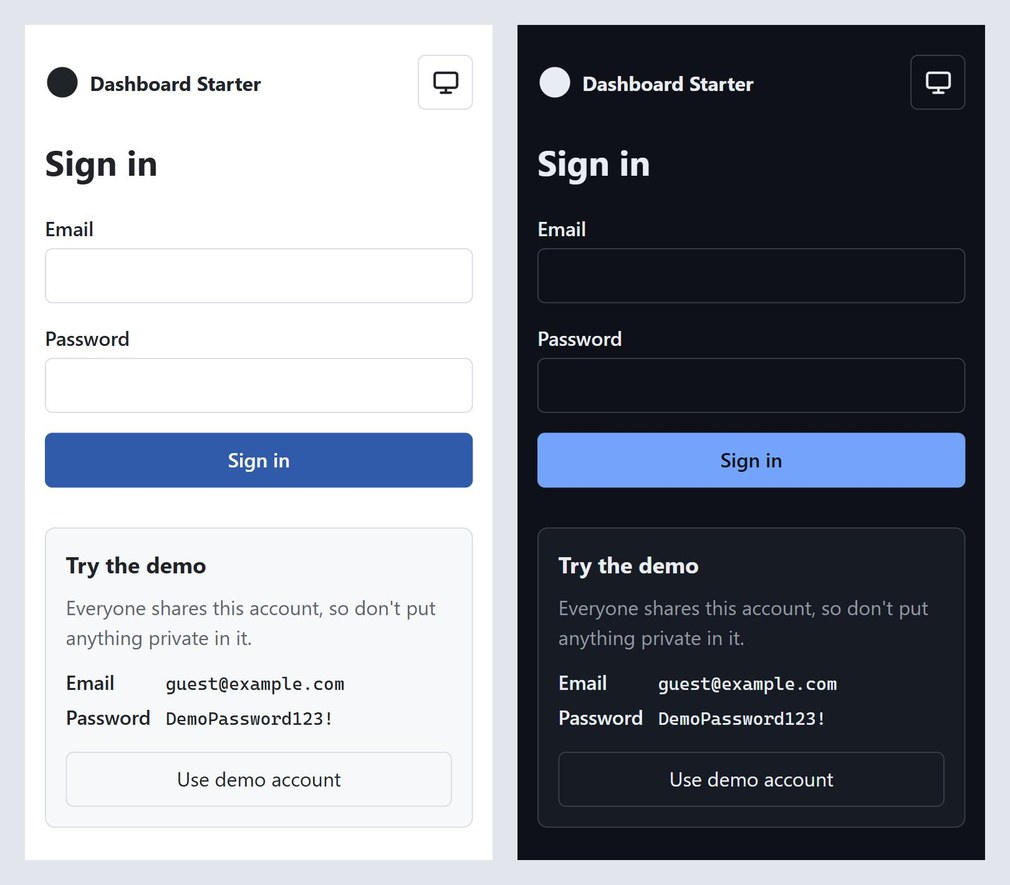
Step 5 is live. Go to dashboard.mvmorten.com and you get a sign-in page now, not the dashboard. Tap "Use demo account," sign in, and you're in a shared demo account that belongs to two tenants, with a switcher in the top bar to move between them.
It took one big pull request and four small ones to get there, and for most of a day the live site was still the old version without sign-in, because the deploy kept failing. This post covers both: how sign-in works, and what happened after I merged it.
Michael's tip
Yay! We're in. Now what?
No Identity, no JWT
The README FAQ has the long version, so briefly: ASP.NET Core Identity does a lot you can't easily see, and its built-in UI is Razor Pages, which a React app doesn't use. JWTs are for clients that aren't browsers. This app has one client, a browser on the same site, so it gets a plain cookie.
What we use from ASP.NET Core is the cookie authentication middleware and authorization policies. Everything else is our own code against our own Users table: sign-in, lockout, sessions ending after a password change. Each piece is a small amount of code you can read, and you can follow a sign-in from the React form to the SQL that checks the hash.
Passwords: the one package .NET doesn't have
Passwords are hashed with Argon2id, OWASP's first recommendation. It's memory-hard, so each guess costs memory as well as CPU, which takes away most of an attacker's GPU advantage.
.NET doesn't include Argon2, even in .NET 10. Built-in PBKDF2 is OWASP-approved and would have meant no new dependency. I went with Argon2id anyway, through Konscious.Security.Cryptography.Argon2, the most used managed implementation. Under the "no libraries until we have to" rule, a package has to earn its place through necessity, safety, or correctness. This one earns it on safety.
It sits behind our own small IPasswordHasher interface. Hashes are stored as PHC strings, which carry their own settings (19 MiB of memory, two passes, one lane). When the settings go up later, a user's hash is redone the next time they sign in.
A few rules around sign-in:
One failure message. Unknown email, wrong password, locked account: they all get the same answer, so the sign-in form can't be used to find out who has an account. An unknown email still runs a full hash against a dummy value, so the response time doesn't give it away either.
Lockout, except for the demo account. Five failures in a row locks an account for 15 minutes. The demo account is exempt. Its password is published on purpose, so anyone could otherwise lock every visitor out with five bad guesses. It's protected by rate limiting on the sign-in endpoint instead, using ASP.NET Core's built-in rate limiter.
The cookie
Deployed, the session cookie is called __Host-ds-auth. It's HttpOnly, so JavaScript can't read it, Secure, and SameSite=Lax. The __Host- prefix is a browser rule: the cookie must be Secure, sent from the exact host, and can't be set for a parent domain. In local development the prefix is dropped, because the Vite dev proxy is plain http.
Sessions slide: eight hours from your last request. On top of that, every request rechecks that your account is still active and still a member of the tenant you're in. The answer is cached for at most 60 seconds. That's what makes "removing access works right away" in the README true, and it's also how changing a password signs out your other sessions.
The cookie holds your user and your current tenant. Switching tenants checks your membership and issues a new cookie. The tenant list that was a public stub in step 4 now comes from the signed-in session.
A fallback policy requires a signed-in user on every endpoint. Anything public has to say so with [AllowAnonymous]: the health check, sign-in, and the antiforgery token.
Antiforgery, and one alert I'm keeping
Cookies come with one classic risk: another site can trick your browser into sending a request that carries your cookie. SameSite does most of the work against that. Antiforgery tokens do the rest. One global filter checks every request that changes data, and the front end's api.ts sends the token as a header.
For that to work, the front end has to read the token, so its cookie is deliberately not HttpOnly. GitHub's code scanning flagged exactly that. It's a fair thing to flag in general and correct here, so it stays.
Keys that survive a deploy
This is the part I didn't think about until the brief forced it.
The auth cookie is encrypted with ASP.NET Core's Data Protection keys. By default those keys live in memory or on the container's disk. On App Service, every deploy or restart would throw them away, and every signed-in user would be signed out.
The brief suggested a small table in our own database to hold the keys, with no new package. I chose the Azure way instead: keys in Blob Storage, wrapped by a Key Vault key that never leaves the vault, reached with the app's managed identity, so no storage key or secret sits in the app's settings.
Michael's tip
It's the "right" answer per Azure, and per my certification. Separation of concerns.
That cost three packages and two new Azure resources, which is more than the no-libraries rule would like. I think it's worth it: the keys that protect every session don't sit in the same database as the data they protect, and a stolen copy of the blob is useless without the vault. It's also the only Azure-specific code in the app, and it only switches on when its two settings are present. Anywhere else, the app runs exactly as before.
Accounts without a sign-up page
There's no registration page. Most business apps don't have one: someone sets you up. Until roles and invites exist, accounts come from the Db runner, the same command-line tool that runs migrations:
create-usercreates a user and optionally adds them to a tenant.set-passwordsets a password and ends that user's other sessions.democreates the public demo account and its tenants.
The password is typed at a hidden prompt or piped in with --password-stdin. It's never a command-line argument, which would end up in your shell history.
The deploy pipeline runs demo on every deploy, but only when the repo variable DEMO_ENABLED is true. Fork the starter and you don't get a public demo account unless you ask for one.
CI signs in, on every pull request
The new CI step starts the API against a real SQL Server and checks sign-in end to end with curl. A wrong password fails with the generic message. Five failures lock a normal account but not the demo one. A request that changes data without the antiforgery token is rejected. Switching tenants works. Changing a password ends the old session. An old hash gets redone. And in Production mode, the cookies have their __Host- names and flags, and HSTS is on without includeSubDomains, since forks will run on domains whose owners never agreed to that.
Two things broke while writing those checks. The rate-limit check used up the sign-in limit, so every check after it failed. It runs last now. And once every endpoint required sign-in, a request for a missing file got a 401 instead of a 404. A small controller fixes that.
Not one clean pull request
Step 5 was supposed to be one PR. Here's what actually landed, in order:
- #20 and #21: Dependabot updates.
- #22: sign in and sign out, the main PR.
- #23: fix for the deploy, which hadn't worked since #22 merged.
- #24: a second demo tenant.
The last three are the interesting part.
I merged it before the infrastructure existed
Step 5 added a storage account and a Key Vault to the Bicep template. The deploy guide says to re-run the template before merging a change like that. I didn't. I wanted it live so I could iterate, and I didn't realize the pipeline was where it would break.
Michael's tip
Oh, here we go again.
The first deploy failed with "No Data Protection key storage." The resources simply didn't exist yet.
What I didn't have to worry about was a half-broken site. The deploy failed before it changed anything, so visitors kept getting the old version without sign-in until the final fix went out. The gates from post 3 did exactly what they're for.
Michael's tip
CI/CD and the gates saved me there.
The password nobody knows
Re-running the template needs the SQL Server admin password. I went looking for wherever I'd saved it and couldn't find it, because I never had. In post 3, the password was generated in my shell and stored straight into a GitHub secret. You can write a GitHub secret, but you can never read it back.
So we generated a new one, ran the template with it, and updated the secret. That changed the admin password. The live site never noticed: the API logs in as its own limited login, dashboard_app, which only the pipeline uses the admin login to manage.
Michael's tip
It was weird at first. I think this way is better: no worrying about keeping it secure outside the environment.
The admin password exists in exactly one place, the place that uses it. If you need it, you rotate it.
Not Found, for a key that exists
The next run failed at "Not Found," looking up the Key Vault key the template had just reported creating. Running the same lookup by hand reproduced it. Looking the key up a different way returned it right away (an az quirk with how it reads a vault/key name). PR #23 switched to the form that works and made the step stop with a clear message if the key is ever missing, instead of carrying on with an empty setting.
One more trap: GitHub titles a failed step with the first line of its script, so the error looked like it came from a storage account lookup three lines above the real problem. The log was right. The title was misleading.
Demo, the tenant? Demo, the user?
Once it was live, I signed in with the demo account and couldn't tell what "Demo" was. The tenant? The user? Both?
With a single tenant, the demo also couldn't show one of the main ideas of the starter: one account that belongs to several tenants, with a switcher between them. So PR #24 gave the demo account a second tenant, "Other Demo."
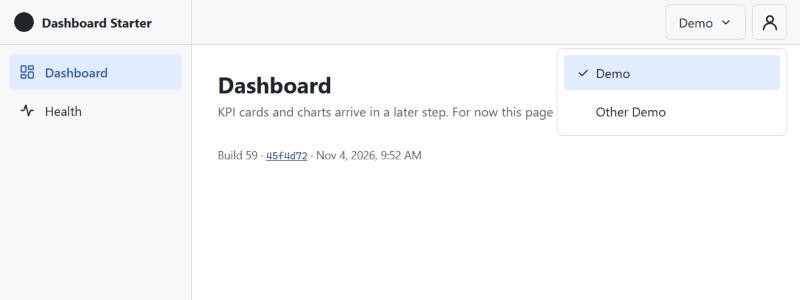
It went into the demo command instead of a hand-run insert in production, so every deploy, and every fork that turns the demo on, gets the same setup.
One side effect: you land in the tenant the account used last, and the demo account is shared. So you start wherever the previous visitor left off. For a demo, that's fine, even a little fun.
Dependabot, again
Two security tools did their jobs this step.
CodeQL found a real bug. When antiforgery rejected a request, the log message included the request path, which a client controls. Put an encoded newline in the URL and you can forge a fake line in the logs. The fix logs the name of the controller action instead, which comes from the app, not the request.
Dependabot was the other one, and this time the lesson was mine to relearn. PR #21 moved React Router from version 7 to version 8. That's a major version, one week after I wrote in post 4 that majors deserve a second look. I skimmed the title and figured I'd test it live. It works. But "it worked" isn't the same as "I checked," and the Dependabot config still lets React Router majors through. That's a one-line change I should make.
Working with AI on this
Same setup: one AI to plan and write the brief, Claude Code to build and test.
Michael's tip
AI cut down the time it would have taken me to find the problem, as I'm newer to GitHub Actions and Bicep.
The brief did its job. It raised the questions before the build: where the keys live, whether the demo account can be locked out, what happens to forks. The demo lockout one would have been an easy bug to ship, and a strange one to debug on a public site.
The PR template only works if you fill it in. The main PR merged with its Checks and Build log sections still saying TODO. The security review summary was never written down, and neither was the screen check.
The AI can't see production. Same as post 3: it couldn't reach the GitHub logs or the live site, so I ran the commands and pasted output back. It was the AI that suggested re-running the Bicep template and generating a new password, but I typed every command that touched Azure.
What I'd do differently, and what's next
I'd run the infrastructure before merging the code that needs it. The guide said so. A better fix is for the pipeline to check: if the template has changed, compare it against what's actually deployed (Bicep can show what it would change) and stop before the code goes out. Then the next person who skips the guide gets a clear message instead of a failed deploy.
I'd also treat a TODO in a PR description as a failing check. It's easy to merge past one when CI is green.
And I'd read the major version bumps.
Next up is post 6: password reset and change password. That brings tokens you can't guess, sessions that end when a password changes, and the first email the app ever sends, which means picking how to send it without adding more than we need.
The code for this post is tagged v0.5. Sign in at dashboard.mvmorten.com, switch tenants, and tell me what breaks.